



What Is a CI/CD Pipeline? A Beginner’s Guide to Continuous Integration and Deployment
Meta description: Learn what a CI/CD pipeline is, why it matters, and how each stage — build, test, and deploy — works together to ship code faster and safer.
If you’ve ever pushed code and waited anxiously to see if it broke production, a CI/CD pipeline is the fix. It’s the automated system that takes your code from a commit to a running application, catching problems along the way instead of after the fact.
What does CI/CD actually mean?
CI (Continuous Integration) is the practice of merging code changes into a shared repository frequently, with each merge automatically built and tested. Instead of integrating a month’s worth of changes at once — a recipe for painful merge conflicts — CI keeps the codebase in a constantly working state.
CD (Continuous Delivery/Deployment) picks up where CI leaves off. Continuous delivery means every change that passes the pipeline is automatically prepared for release, with a human approving the final push to production. Continuous deployment goes one step further and skips the manual approval — passing code ships automatically.
The five core stages of a CI/CD pipeline
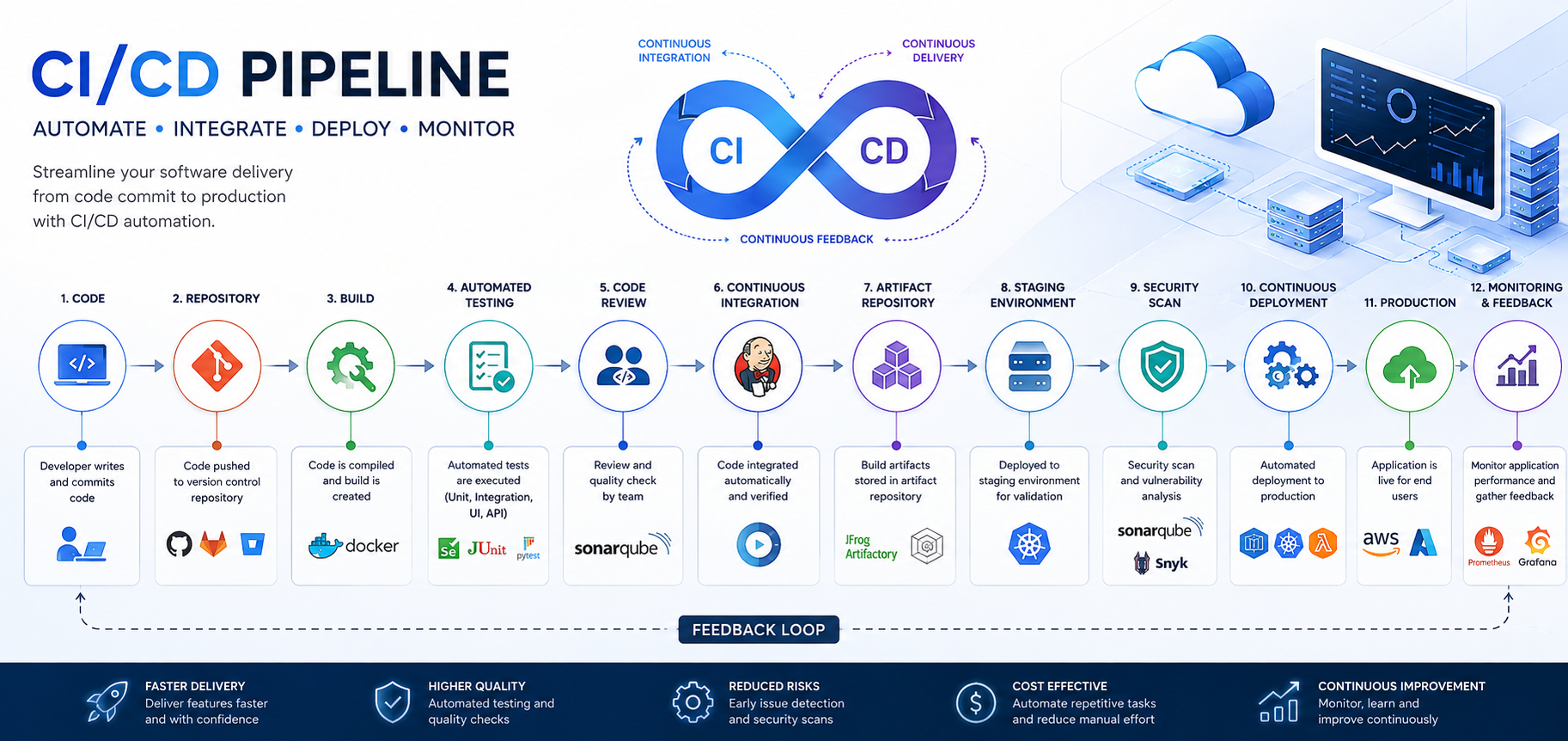
Every CI/CD pipeline is a variation on the same basic flow:
1. Commit — A developer pushes code to a shared repository (GitHub, GitLab, Bitbucket). This is the trigger that kicks the whole pipeline into motion.
2. Build — The code is compiled or packaged into a runnable artifact — a binary, a Docker image, a bundled frontend app. If the build fails here, nothing downstream even runs.
3. Test — Automated tests run against the build: unit tests, integration tests, sometimes linting and security scans. This stage is what makes CI continuous — it happens on every single commit, not once a week.
4. Stage — The build is deployed to a staging environment that mirrors production. This is where you catch the bugs that only show up under realistic conditions — real infrastructure, real data shapes, real network calls.
5. Deploy — The build goes live. Depending on your setup, this might be a blue-green deployment, a canary release to a small percentage of users, or a straight rolling update.
Why teams adopt CI/CD
- Faster feedback loops. A broken build is caught in minutes, not discovered days later during a release.
- Smaller, safer changes. Frequent small deployments are easier to debug and roll back than infrequent giant ones.
- Less manual toil. Testing and deployment steps that used to eat an afternoon run unattended in the background.
- Consistency. The same automated steps run every time, removing “it worked on my machine” as an excuse.
Getting started with your first pipeline
- Start with CI, not CD. Automate builds and tests first. Get comfortable with the feedback before automating deployment.
- Keep your test suite fast. A pipeline that takes 40 minutes to give feedback defeats the purpose — teams start ignoring it or working around it.
- Add staging before production. Never let a pipeline deploy straight to production without a realistic dry run first.
- Automate the rollback, not just the rollout. A pipeline should make it just as easy to revert a bad deploy as to ship a good one.
CI/CD isn’t a single tool you install — it’s a set of practices your team adopts, expressed as automation. Start small: automate the build and test steps first, get confidence in the feedback loop, and only then automate your way to production.

Comments are closed